Best Practices & FAQs
Last updated: September 2, 2026
Best Practices & FAQs
I need an update on a work order request. What should I do?
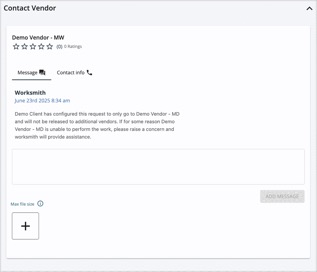
• Reach out to your vendor directly on the work order — you can do so via the messaging box at the bottom of the work order.
• If your vendor does not respond to your message within 24 hours on a standard, non-emergency work order, please call them. The phone number is listed as well.
• If your vendor does not respond to your message within 2 hours on an emergency work order, please call them. The phone number is listed as well.
• Still having trouble getting in contact with the vendor, or unable to come to an agreement with them? Reach out to your dedicated Service Manager. They’ll contact the vendor and come back to you with next steps.
I have an emergency outside of business hours. What should I do?
• Submit a work order request. We have a dedicated on-call team who oversees emergency work orders outside of business hours and will ensure that a vendor actions on your request.
If you need an urgent update, send a message on the work order. If you don't receive a response within 2 hours, email On-call@worksmith.com for after-hours and weekend support. |