Approval Settings
Last updated: September 2, 2026
Approval Settings
You can adjust your approval settings at any time by selecting “Approval Settings” from the account menu in the top right of your dashboard.
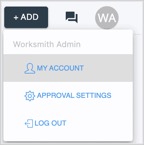
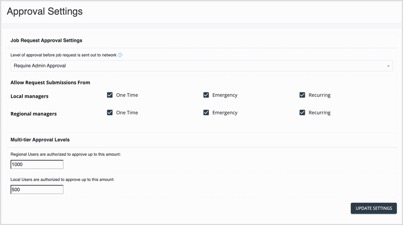
If you'd like to set up not-to-exceed (NTE) thresholds by service line, please reach out to your Service Manager. |
Customization options
In addition to setting up a pricing threshold for one-time and emergency requests (these can be two different amounts), you have the following customization options:
Priced walkthrough auto-accept
• Accept price and schedule for all requests
• Accept price and schedule for emergencies only
• Accept price and schedule if during business hours
• Accept price only, always send to scheduling
• Never auto-accept priced walkthroughs
Estimate auto-accept
• Accept price and schedule for all requests
• Accept price and schedule for emergencies only
• Accept price and schedule if during business hours
• Accept price only, always send to scheduling